Review Comments (0) Screenshots (4) Questions & Answers (0) Votes (0) Awards (1) Wiki  
Mz Ultimate Tools
3.1
www.mztweak.com
Freeware
60 people
Download Mz StartUp Manager

1.16 MBDownloaded 201 times

 
Video tutorial for Mz StartUp Manager 3.1
Frame

Review

This is official description

Mz StartUp Manager was designed to help users easily control Windows startup configuration. You can add, enable-disable or delete unwanted programs which automatically start after boot, making the startup procedure more efficient and faster.
Supported Operating Systems: Windows XP / 2003 / Vista / 7 (full Windows x64 support).
 
The following review written by one of the Software Informer contributors applies to version 2.3

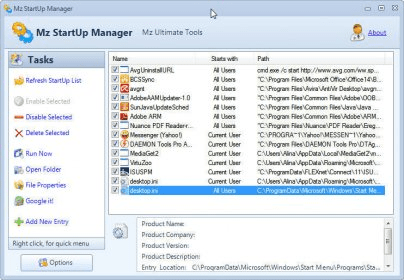
It is always important to know what processes are being loaded in your system during Windows startup. The first reason is that the big amount of such processes enlarges duration of startup and if there are too many processes that you actually don’t need then it’s just a time wasting. The second reason is that any type of harmful applications, like viruses and spyware, can hide among safe processes. Mz Startup Manager is software that was developed for managing processes on startup. It can be used for enabling, disabling, removing and adding entries into the startup menu. The program has a very simple and easy-to-use interface. Its main window contains the list of all processes that are loaded on startup. For performing any of above-listed tasks you can use both a special toolbar and mouse right-button click pop-up menu. When you select any process in the list you can see detailed information about it that includes the product name, product company, product version and product description. The application has very low system requirements and doesn’t slow down performance of computer.
  • Great design.
  • Doesn't have a user guide.

Reviewed by: Ilya Barmenkov

Reviewer rating:

Reviewed: 2 years ago

Report a wrong version Report a wrong program title Suggest a correction

Screenshots

Main window Main window Main window Main window Mouse right-button click popup menu Mouse right-button click... Entrie delete confirmation Entrie delete confirmation

Latest comments


There are no comments, be the first one!
Add new comment

E-mail Address:

Password:

Register now »

Forgot password?

Sign in with:
Download Software Informer Client
Copyright © 2012, Informer Technologies, Inc. About| Privacy and terms| Help| Feedback & Support| Partners program